Physical Cores beat Hyper-Threads? Benchmarking the vCPU Illusion
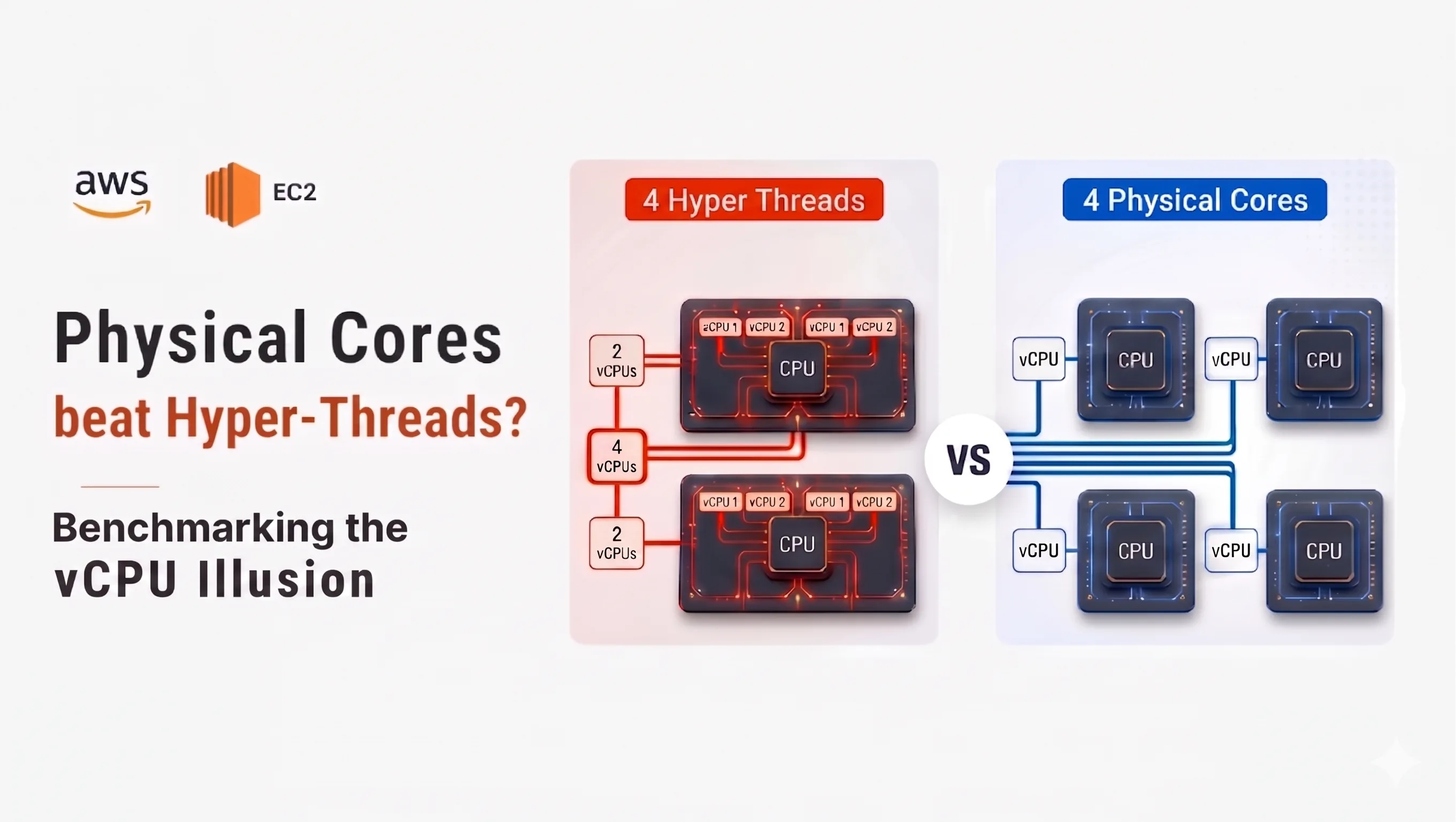
In the Cloud, VM instance selection is usually done by comparing instance family, number of vCPUs, memory size, hourly cost etc. It is easy to assume that two instance types with the same number of vCPUs should provide roughly similar compute performance. However compute performance depends on subtle difference - whether vCPUs are backed by hyper-threads or dedicated physical cores.
For example if we compare AWS EC2 instances m7i.xlarge and m7a.xlarge on high level -

Both provides same number of vCPUs and RAM. Hourly cost difference is roughly 15% higher for m7a family of instances compared to m7i family of instances. However in the case of m7i family of instances - 4 vCPUs are backed by 2 physical cores (2 threads per core), where in the case of m7a family of instances - 4 vCPUs are backed by 4 dedicated physical cores (1 thread per core) which provides far more compute power than m7i instances.
But why this difference matters?
With 4 vCPUs backed by 2 physical cores - each physical core runs 2 hyper-threads (HT), this is also known as simultaneous multi-threading (SMT). The OS sees 4 schedulable CPUs, but pairs of threads share the same core resources such as execution units, cache, and memory pipeline.
With 4 vCPUs backed by 4 physical cores, each vCPU maps to its own physical core. Threads get dedicated core resources and CPU-bound workloads can run with much less internal contention.
The value of hyper-threads lies in their ability to maintain throughput; when one thread hits a bottleneck like memory latency, its sibling thread steps in to utilize the vacant CPU core resources.
But for heavy CPU-bound workloads where all threads actively need execution resources, VM with 4 physical cores usually outperform VM with 2 cores with 4 hyper-threads due to 2x execution resources are available.
For the purpose of this post, I will compare performance of m7i.xlarge and m7a.xlarge instances using different types of workloads such as Regex based log analyzer, data-analytics with Polars and ML Training with FAISS KMeans clustering. The goal is not to declare one instance family is universally better than the other, but to understand when additional physical cores can make a large difference for certain type of CPU-bound workloads. All sample code reference used in this post is available in repository ht-performance.
Assessing performance with sysbench
Before we jump to real-world like workloads, Let’s observe CPU performance with sysbench tool. It checks the CPU performance by calculating prime numbers up to a specified value. Since this is a purely computational task, it measures the raw processing speed and the efficiency of the system’s multi-threading. Since we are having 4 vCPUs we will test with 4 threads -
sysbench cpu --cpu-max-prime=20000 --threads=4 --time=30 run
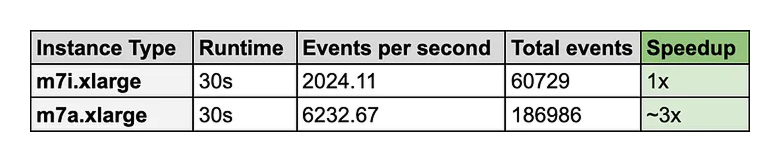
With same benchmark compute code running on both machines with same 4 vCPUs - This CPU-bound task runs ~3x faster on m7a family instance.
Analyzing multi-threaded scalability
To evaluate performance impact of increasing concurrency on CPU-bound workloads, I developed a synthetic C++ benchmark. This application simulates intensive string-processing tasks to saturate CPU resources, allowing for a controlled observation of how execution latency scales under varying thread counts.
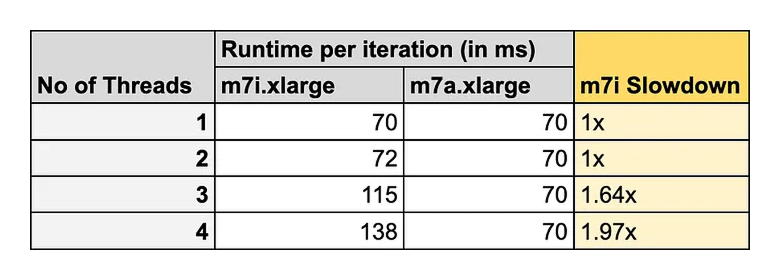
For m7i.xlarge instance - data highlights a clear correlation between thread concurrency and execution latency. At a single thread, the system maintains a baseline latency of approximately ~70 ms. Moving to two concurrent threads demonstrates excellent parallel efficiency, as the total workload doubles while the execution time remains virtually unchanged. However, since this instance has only 2 physical cores - a performance inflection point is reached at three threads, where latency increases by roughly 64%, and further degrades to ~138 ms at four threads. The doubling of latency at four threads suggests the contention for shared CPU resources.
For m7a.xlarge instance - there are 4 physical cores and latency remains unchanged for up to 4 threads. Since there are same number of physical cores as number of concurrent threads, there is no CPU resource contention and all threads run without any observable performance degradation.
Performance with real-world workloads
To analyze head-to-head performance difference between m7i.xlarge and m7a.xlarge - I prepared few example scenarios -
Log Analyzer - Java application that processes 8 GB log files in parallel.
Data Analytics - Python application powered by Polars library that analyzes 200 million synthetic customer order data
ML Training - Train FAISS KMeans model on 2 million synthetic training samples
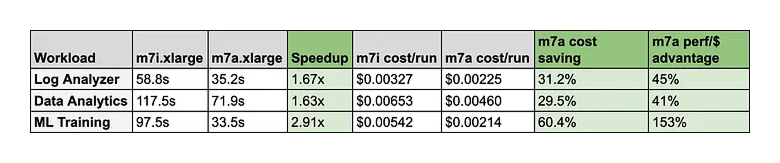
A few takeaways are worth highlighting:
ML Training is the standout. The m7a is 2.91x faster. The performance-per-dollar advantage is +153%, meaning the 15% price premium is essentially noise compared to the compute gain.
Log Analyzer and Data Analytics are more moderate ~1.6x, likely because those workloads have more I/O and memory-bound phases where raw compute performance gains are partially masked.
Cost per run tells a more useful story than hourly pricing. At first glance, m7i.xlarge looks cheaper because it costs around $0.20/hour compared to $0.23/hour for m7a.xlarge. But once runtime is included, m7a.xlarge becomes cheaper per completed job in every benchmark. Across these three workloads, total runtime dropped from 273.85 seconds to 140.64 seconds, and estimated compute cost dropped from around $0.0152 to $0.0090 per run.
These numbers should not be treated as universal AWS performance claims. They represent my benchmark setup, input sizes, libraries, runtime configuration, and the specific instances I received during testing. Specifically m7i.xlarge EC2 performance can vary depending turbo behavior where it supports 3.2 GHz basline all-core turbo frequency with max core turbo frequency of 3.8 GHz. These turbo frequency keeps changing based on thermal state of the VM.
However, even with turbo variability, one architectural difference remains important: on m7i.xlarge, 4 vCPUs are backed by 2 physical cores with hyper-threading, while m7a.xlarge provides 4 physical cores. When CPU-bound workloads run across hyper-threads, sibling threads share execution resources on the same physical core. That resource contention becomes visible when the workload is able to keep all vCPUs busy. When workload is running on hyper-threads, CPU-bound tasks will face resource contention and won’t match performance where dedicated physical cores are present.
Conclusion
For batch compute workloads that can keep all cores busy, the cheaper hourly instance is not always the cheaper compute choice. In this test, m7a.xlarge cost 15% more per hour, but delivered much faster completion time and lower cost per run.
The biggest lesson from this comparison is not simply that m7a.xlarge is faster. The real lesson is that 4 vCPUs does not always mean the same thing across instance families. When those vCPUs map to dedicated physical cores instead of hyper-threads, CPU-bound workloads can behave very differently.
This is not specific to AWS. The same principle applies on other cloud platforms such as Azure and Google Cloud as well. Whenever an instance exposes vCPUs backed by hyper-threading, 2 vCPUs may be sharing execution resources on the same physical core. For workloads that are heavily parallel and CPU-bound, that distinction can directly affect runtime, throughput, and cost per completed job.